Most chess training is generic. The puzzle you solve this morning was chosen for a million players, not for you. The video you watch tonight covers an opening you may never reach. And a report, however detailed, stops at the diagnosis: it tells you what is wrong and leaves you to work out what to do about it.
A coach does the next part. A good one knows your games, decides what matters most right now, and gives you practice built from your own mistakes. The Lumichess AI Coach is built to do exactly that, every day, in about fifteen minutes. This guide walks through how it works, using a real player's games.
The short version
- The coach reads your recent games and scores six skills, then names your biggest leak.
- It writes you a short brief: what is costing you rating, what to do first, and what is already working.
- Every day it builds a 15-minute session of positions taken from your own games.
- Five trainers turn your games into practice: your blunders, the motifs you miss, your openings, your endings and the wins you let slip.
- On any move you can press Explain and get an answer about that exact position.
A report versus a coach
A Profile Report is a diagnosis: it reads your last 40 games and shows which skills are strong and which are costing you. That is valuable, and how to find your chess weaknesses explains how to read one. But a diagnosis is not a training plan. Knowing that you miss forks does not tell you which forks to practise, or when.
A coach closes that gap in three ways. It remembers: it knows your games and your history, so it does not start from zero each time. It plans: it decides what you should practise today, based on what is costing you most. And it drills your own mistakes: the positions you practise are ones you actually reached and got wrong, not ones picked for somebody else.
Step 1: it reads your games
When you connect a Chess.com or Lichess account, the coach reads your recent games in the time control you play most and scores the same six skills as the Profile Report: openings, tactics, endgames, converting winning positions, time management and resourcefulness when you are worse.
Take a real example: a Chess.com player rated around 800 who plays almost only bullet. Reading their last 40 bullet games, the coach scored openings at 78 and endgames at 74, both strong, and time management at 13, by far the lowest. Of their 23 losses in those games, 19 were on time. The coach's verdict on the first screen: your #1 leak is time management.
Step 2: it tells you what to fix
Then the coach writes a brief, in plain language, at the top of your hub:
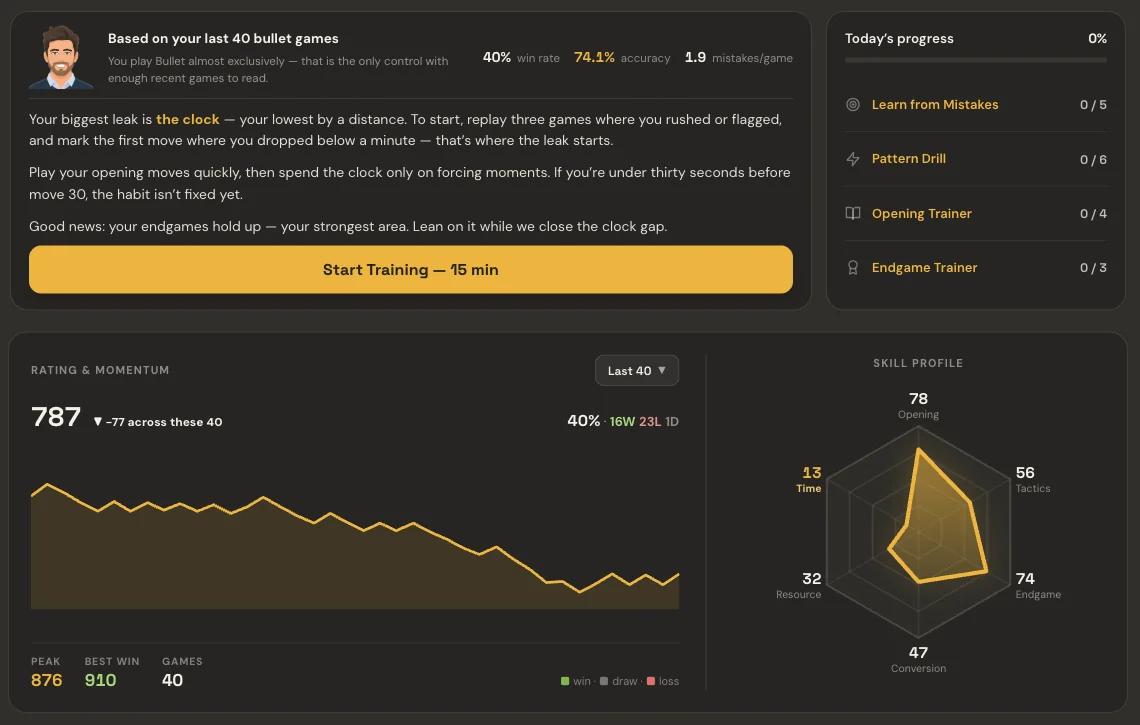
For this player the brief names the clock as the biggest leak, lowest by a distance, and turns it into steps: replay three games where you rushed or flagged and mark the first move where you dropped below a minute, because that is where the leak starts. Play your opening moves quickly and spend your clock only on forcing moments. And it notes the good news: the endgames hold up, so lean on them while the clock gap closes.
That is the difference between a statistic and advice. "Time management: 13" is a number. "Find the move where you dropped below a minute" is something you can do tonight.
Step 3: a daily session from your own games
Each day the coach builds a session that takes about fifteen minutes. On the day of this example it held 18 positions across four trainers, with progress shown for each: Learn from Mistakes, Pattern Drill, Opening Trainer and Endgame Trainer.
The positions come from your own games. Here is one from the session, a moment from one of the player's bullet games:
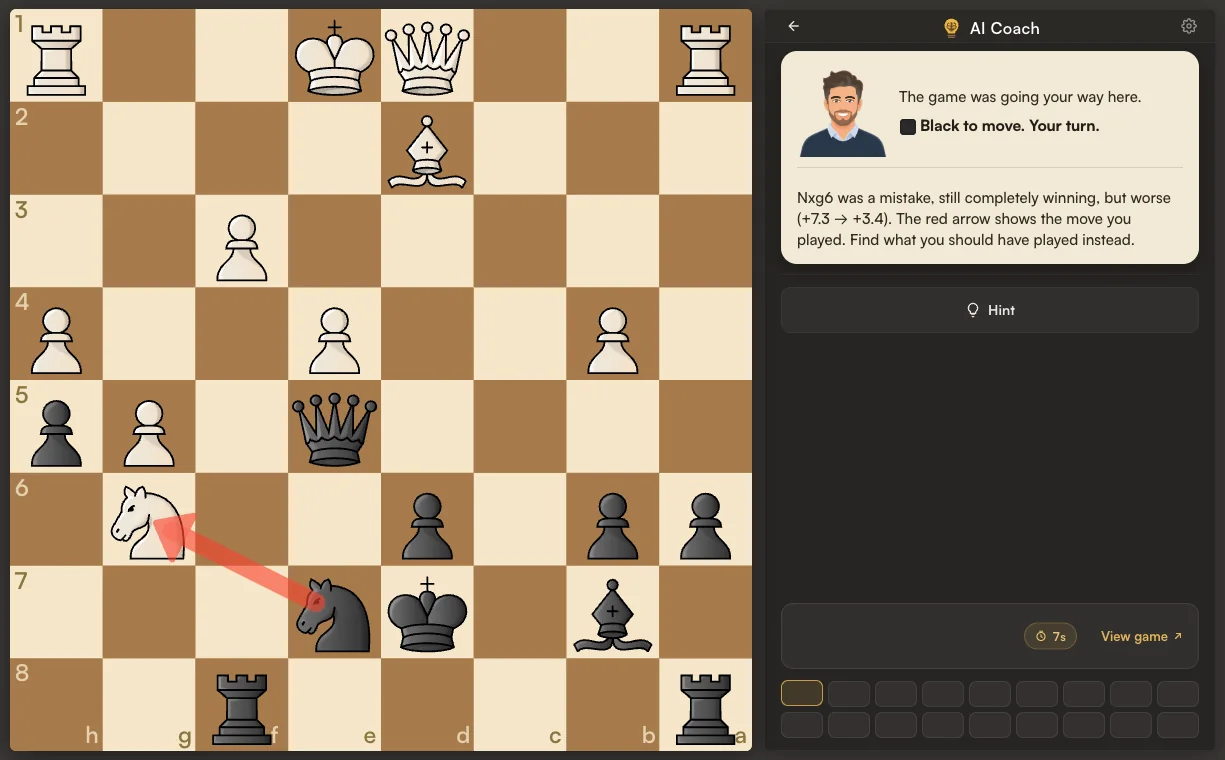
The coach sets the scene, draws the move you actually played in red, and asks you to find what you should have played instead. A hint is there if you are stuck, and the full game is one click away. It is the same idea as the "would I find it now?" step in the review routine, done for you across all your games, every day.
The five trainers
Every trainer is fed by your own games, filtered a different way:
| Trainer | Built from | What it trains |
|---|---|---|
| Learn from Mistakes | The blunders you made | Finding the move you missed, in the position you missed it. |
| Pattern Drill | The tactical motifs you miss | Recognising those motifs faster. |
| Opening Trainer | The lines you actually play | Your own repertoire, where you leave it. |
| Endgame Trainer | The endings you lose | Technique in the endgame types that cost you. |
| Advantage Conversion | The wins you let slip | Finishing positions you should have won. |
The first four make up the daily session. Advantage Conversion is there to open whenever you want to work on finishing games. Alongside them, the hub keeps your Woodpecker training and your training record in the same place.
Asking why
Knowing the right move is not the same as understanding it. On any move, in a report, a drill or the chat, you can press Explain, and the coach answers about that exact position: the piece that hangs, the square that opens, the reply you did not see. Not general chess advice, but the reason this move in this position was good or bad.
You can also simply ask. The coach's chat answers questions about your own games and history, such as which openings are costing you points, and pulls up the positions behind its answer.
Getting the most from a coach
- Do the session every day. Fifteen minutes daily beats two hours once a week. The habit is the point.
- Solve before you peek. The value is in finding the move, not reading it. Use a hint only when you are truly stuck.
- Press Explain when a move surprises you. A move you cannot explain is a move you will not find next time.
- Keep playing, and keep reviewing. The coach learns from new games, so the sessions follow your chess as it changes.
- Check the skill profile every few weeks. The skill you have been training should be the one that moves.
Why your own games
A position from your own game is one you really reached, at your level, against the kind of opponent you really face, and one you have already shown you get wrong. There is no better evidence that a pattern is worth practising.
Frequently asked questions
What is an AI chess coach?
A tool that reads your own games, finds what is costing you rating, and builds your practice around it. The Lumichess AI Coach scores six skills, names your biggest leak and builds a 15-minute daily session from positions in your own games.
Where do the training positions come from?
From your own Chess.com or Lichess games: the blunders you made, the motifs you missed, the openings you play, the endings you lose and the wins you let slip.
How long does a daily session take?
About fifteen minutes. It is built to be short enough to do every day.
What does Explain do?
It answers why a move was good or bad in that exact position: which piece hangs, which square opens, what reply was missed. It works in reports, drills and the chat.
How is the AI Coach different from a Profile Report?
The Profile Report is a diagnosis of your last 40 games. The AI Coach uses the same reading to plan and run your daily training, and keeps adapting as you play more games.
Which accounts does it work with?
Chess.com and Lichess. The coach reads the time control you play most, so the training matches the games you actually play.