Chess.com gives a free account one Game Review a day. If you play five blitz games in an evening, four of them go unreviewed, and they are usually the ones you most wanted to understand.
This guide sets out exactly what the free Chess.com account includes, using Chess.com's own pages, and then two free ways to review every game you play with no daily limit. Neither needs your Chess.com password, and neither breaks any rule.
The short version
- A free Chess.com account gets one Game Review a day. Unlimited reviews need a paid Platinum or Diamond plan.
- On Lumichess, type your Chess.com username, pick any game and get a full review with no daily limit, free and without signing up.
- On Lichess, you can import a game's PGN and request a free computer analysis.
- You only ever need your username. Never give another site your Chess.com password.
What a free Chess.com account gets
Chess.com's glossary page on Game Review puts it plainly: non-paying members get one free Game Review every day, and Platinum or Diamond members can run unlimited Game Reviews. Its help centre adds that free members can still see accuracy, move classifications and Self Analysis, and that opening a review you already generated does not count against the daily limit.
So the limit is on new reviews. Your first game of the day gets the full treatment. Every game after that waits until tomorrow, or needs a paid plan.
That is a sensible business decision for Chess.com, because its reviews run on its own servers and servers cost money. It is also the reason free alternatives can exist: a chess engine can run inside your own browser, on your own device, at no cost to anyone.
Way 1: review by username on Lumichess
This is the one I built, so I will be specific about what it does. Lumichess runs Stockfish 18 inside your browser and reads your Chess.com games by username, so there is no daily limit to hit and nothing to install.
- Open the free chess game review page.
- Choose Chess.com and type your username. No password, and no Lumichess account needed.
- Press Fetch my games and pick the game you want.
- The review opens on a full analysis board once the engine has been through the game.
What comes back: accuracy for both players, split across opening, middlegame and endgame; an evaluation graph of the whole game; and every move you played sorted into one of eleven labels, from Brilliancy and Great down to Mistake and Blunder. Where a move cost you, the better move is drawn on the board. You can also raise the engine depth, up to 30, for a closer look at the moments that decided the game. The labels are explained in the guide to chess move classifications.
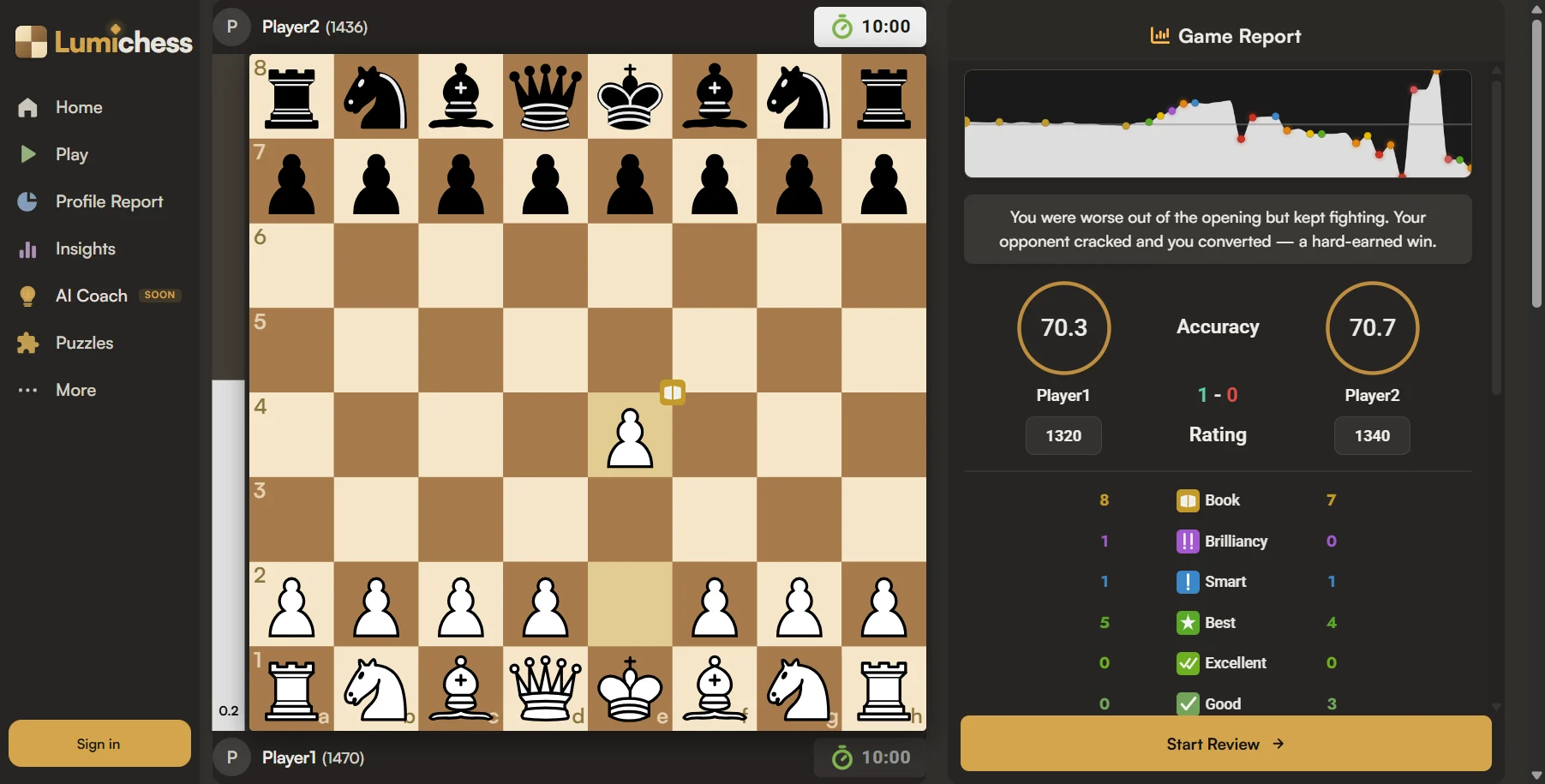
Lichess games and pasted PGN work the same way, and it does not matter whether the game was bullet, blitz, rapid or classical.
Way 2: import the game into Lichess
Lichess is free and open source, and its computer analysis is free too. It does not read Chess.com games by username, so you move the game across by hand:
- On Chess.com, open the finished game and copy its PGN from the share options.
- On Lichess, open Import game (lichess.org/paste) and paste the PGN.
- Request a computer analysis. Lichess marks inaccuracies, mistakes and blunders and shows an accuracy score for each player.
It works well for a single game. For every game you play, copying PGNs one at a time gets tedious, which is where a username lookup saves the most time.
The options side by side
| Option | New reviews | Cost | Getting games in | Brilliant moves marked |
|---|---|---|---|---|
| Chess.com, free account | 1 a day | Free | Automatic | Yes |
| Chess.com, Platinum or Diamond | Unlimited | Paid | Automatic | Yes |
| Lichess import | One game at a time | Free | Paste each PGN | No |
| Lumichess | Unlimited | Free | Your username | Yes (Brilliancy) |
For a fuller comparison of the three sites, including stats and training, see Lumichess vs Chess.com vs Lichess.
Is it allowed?
Yes. Reviewing a finished game with an engine is ordinary study, and it is exactly what Chess.com's own Game Review does. What every site forbids is outside help while a game is still in progress. Review after the game, never during it.
One more rule of thumb: a site that asks for your Chess.com password to review your games does not need it. Your finished games are public data, readable by username. Keep your password for Chess.com.
Frequently asked questions
Is Chess.com Game Review free?
Partly. Chess.com's glossary says non-paying members get one free Game Review every day, and its help centre says free members still see accuracy, move classifications and Self Analysis. Unlimited Game Review needs a paid Platinum or Diamond plan.
How many free game reviews do you get on Chess.com?
One a day on a free account, according to Chess.com's own Game Review glossary page. Opening a review you already generated does not use up that day's review.
How do I get unlimited game reviews for my Chess.com games for free?
Review them somewhere without a daily cap. On Lumichess you type your Chess.com username, pick any game and Stockfish 18 grades every move, as many games as you like. On Lichess you can import a game's PGN and request a free computer analysis.
Is there a free alternative to Chess.com Game Review?
Yes. Lumichess reviews Chess.com, Lichess and PGN games with no daily limit and labels every move from Brilliancy to Blunder. Lichess also offers free computer analysis of imported games.
Do I need to give my Chess.com password to review my games on another site?
No. Lumichess reads your finished games through Chess.com's public data by username only. Never type your Chess.com password into another website.
Is it allowed to review my Chess.com games on another site?
Yes. Analysing a game after it has finished is normal study. What breaks fair play rules on every site is using an engine or any outside help while a game is still being played.