Every chess position can be written as one line of text. That line is a FEN, short for Forsyth-Edwards Notation, and it is how chess sites, engines and tools pass positions to each other. Paste a FEN into an analysis board and the position appears. Copy one out and you can send a position to anyone.
A FEN looks like noise at first, but it is built from six simple fields. This guide takes them one at a time, works through two real positions, and lists the mistakes that turn a FEN into a position no engine will accept.
The short version
- A FEN has six fields separated by spaces: pieces, side to move, castling rights, en passant square, halfmove clock and move number.
- Pieces are listed rank by rank from the 8th rank down, with capital letters for White, lower case for Black and digits for empty squares.
- Each rank must add up to eight squares, and each side needs exactly one king.
- A FEN is a snapshot of one position. A PGN is the whole game.
The six fields
Here is the FEN for the starting position of every chess game:
rnbqkbnr/pppppppp/8/8/8/8/PPPPPPPP/RNBQKBNR w KQkq - 0 1
Split it at the spaces and you get six fields:
| Field | In the starting position | What it says |
|---|---|---|
| 1. Pieces | rnbqkbnr/pppppppp/8/8/8/8/PPPPPPPP/RNBQKBNR | Where every piece stands, rank by rank. |
| 2. Side to move | w | White to move. |
| 3. Castling | KQkq | Both sides can still castle on both wings. |
| 4. En passant | - | No en passant capture is possible. |
| 5. Halfmove clock | 0 | Moves since the last capture or pawn move. |
| 6. Move number | 1 | The game is on move 1. |
Field 1: where the pieces stand
The first field describes the board one rank at a time, starting from the 8th rank (Black's back rank) and ending with the 1st. Ranks are separated by a slash. Within a rank, squares are read from the a-file to the h-file, left to right from White's side.
- Letters are pieces: K king, Q queen, R rook, B bishop, N knight (because K is taken), P pawn.
- Capital letters are White, lower case letters are Black.
- Digits are empty squares. 3 means three empty squares in a row; 8 means an empty rank.
So rnbqkbnr is Black's back rank in the starting position: rook, knight, bishop, queen, king, bishop, knight, rook from a8 to h8. 8/8/8/8 is the four empty ranks in the middle, and RNBQKBNR is White's back rank on the 1st rank.
One check catches most mistakes: every rank must add up to eight, counting each letter as one and each digit as its value. pp3pbp is 1 + 1 + 3 + 1 + 1 + 1 = 8. A rank that adds up to seven or nine is a typo.
Field 2: side to move
A single letter: w if it is White's turn, b if it is Black's. It matters more than it looks. The same arrangement of pieces can be winning for whoever moves first, so an engine given the wrong side to move will answer a completely different question.
After 1.e4, for example, the pieces field changes and the side to move becomes b:
rnbqkbnr/pppppppp/8/8/4P3/8/PPPP1PPP/RNBQKBNR b KQkq - 0 1
Read the 4th rank, 4P3: four empty squares from a4 to d4, a white pawn on e4, three empty squares to h4.
Field 3: castling rights
Up to four letters: K means White can still castle kingside, Q queenside, and k and q the same for Black. When neither side has any rights left, the field is a single dash.
Note the word rights. The field says whether castling is still allowed in principle, meaning the king and that rook have not moved. It does not say castling is possible right now. In the starting position both sides have all four rights even though pieces stand in the way, and a king in check keeps its rights even though it cannot castle that move.
Field 4: the en passant square
When a pawn moves two squares forward, this field records the square it passed over, which is the square an enemy pawn would move to if it captured en passant. Otherwise it is a dash.
After 1.e4 Nf6 2.e5 d5, Black's pawn has just jumped from d7 to d5, past d6, right beside White's pawn on e5. White can capture en passant with exd6, and the FEN records it:
rnbqkb1r/ppp1pppp/5n2/3pP3/8/8/PPPP1PPP/RNBQKBNR w KQkq d6 0 3
Tools differ on one detail. The original standard records the square after every two-square pawn move, so after 1.e4 the field would read e3 even though no black pawn could capture. Many programs only write the square when an en passant capture is actually possible, and write a dash otherwise. Both describe the same position, so if two FENs differ only here, they are almost always the same position.
Fields 5 and 6: the move counters
The halfmove clock counts moves by either side since the last capture or pawn move. It exists for the fifty-move rule: when it reaches 100, meaning fifty moves by each player with no capture and no pawn move, a draw can be claimed. After 1.e4 c5 2.Nf3 it is 1, because 2.Nf3 was neither a capture nor a pawn move:
rnbqkbnr/pp1ppppp/8/2p5/4P3/5N2/PPPP1PPP/RNBQKB1R b KQkq - 1 2
The move number starts at 1 and goes up by one after each Black move, so it matches the numbers in a scoresheet. Neither counter changes what the best move is, and for a position built by hand, where there is no game history, 0 and 1 are the usual values.
A worked example: the Game of the Century
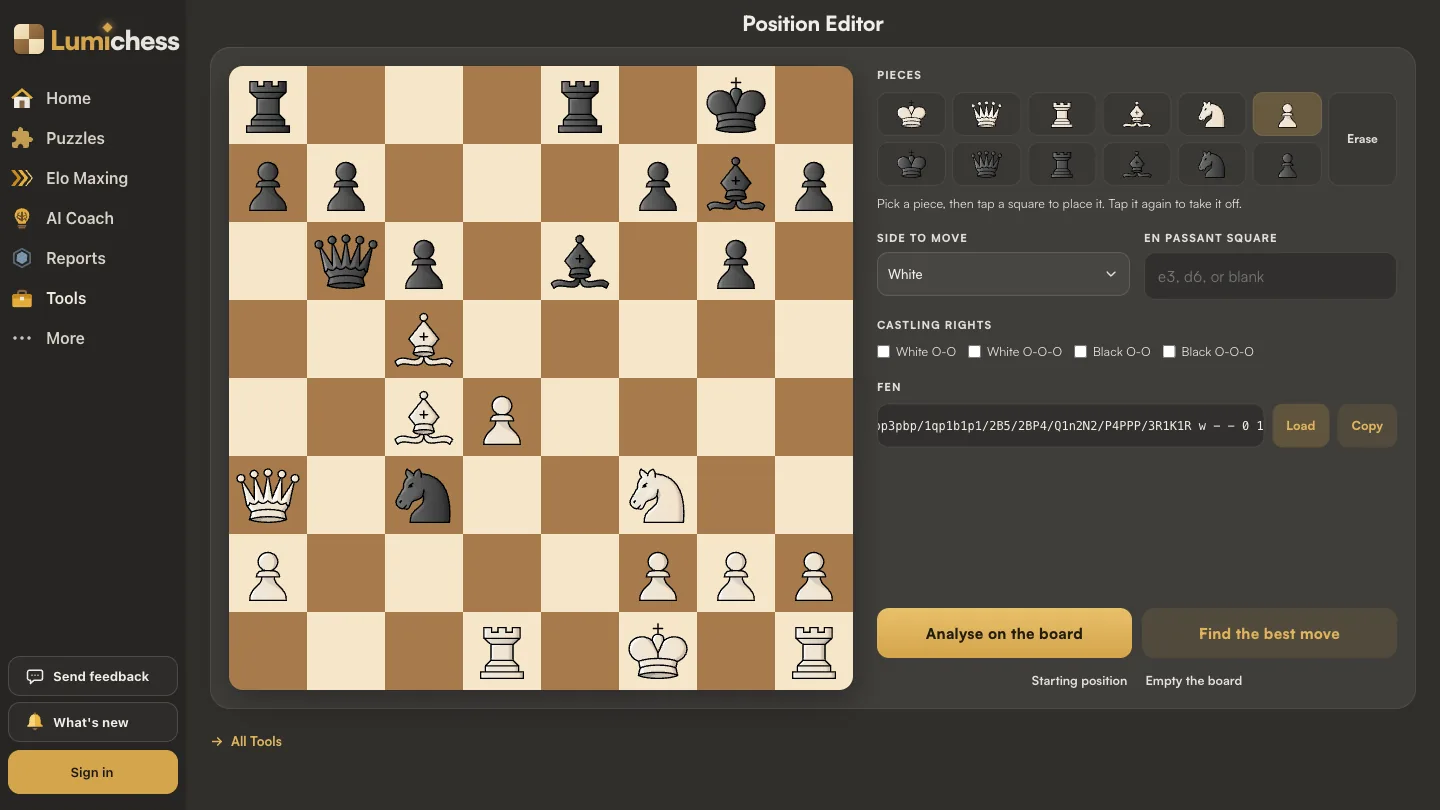
Here is a real position: Byrne against Fischer, New York 1956, just after Fischer's famous 17...Be6, with White to play his 18th move. (The guide to move classifications goes through the whole game.)
r3r1k1/pp3pbp/1qp1b1p1/2B5/2BP4/Q1n2N2/P4PPP/3R1K1R w - - 4 18
Read it rank by rank:
| Rank | FEN | What stands there |
|---|---|---|
| 8 | r3r1k1 | Rooks on a8 and e8, king on g8 |
| 7 | pp3pbp | Pawns on a7, b7, f7, h7; bishop on g7 |
| 6 | 1qp1b1p1 | Queen b6, pawn c6, bishop e6, pawn g6 |
| 5 | 2B5 | White bishop on c5 |
| 4 | 2BP4 | White bishop c4, pawn d4 |
| 3 | Q1n2N2 | White queen a3, black knight c3, white knight f3 |
| 2 | P4PPP | White pawns a2, f2, g2, h2 |
| 1 | 3R1K1R | Rook d1, king f1, rook h1 |
Then the other fields: w, White to move. - for castling, because White's king has already moved to f1 and Black has castled. - for en passant. 4 on the halfmove clock, because the last capture was 15...Nxc3 and four moves have been played since. And 18, White's 18th move.
Mistakes that make a FEN illegal
A FEN can be perfectly formatted and still describe a position that cannot exist. Engines refuse those, or answer nonsense. These are the usual culprits:
| Mistake | Why it is illegal |
|---|---|
| A rank that does not add up to 8 | The board has eight squares per rank; the FEN cannot be read. |
| No king, or two kings, for one side | Every legal position has exactly one king each. |
| A pawn on the 1st or 8th rank | Pawns promote on the last rank and can never stand on their own back rank. |
| The side not to move is in check | It would mean the last player to move left their own king in check. |
| Castling rights with a moved king or rook | The rights say the pieces are on their original squares; if they are not, the FEN contradicts itself. |
| An en passant square with no pawn beside it | The field claims a pawn just jumped past that square. |
The first four are the ones that bite in practice, especially when a position is set up by hand from a book diagram.
FEN or PGN?
The two formats answer different questions. A FEN is a snapshot: one position, with no memory of how it was reached. A PGN is the whole game: the players, the result and every move, from which any position in the game can be rebuilt.
Use a FEN when you want to talk about one position: a puzzle, a moment from a book, the critical point of your own game. Use a PGN when you want the game itself reviewed, as the Game Report does. Many tools, including the Best Move Finder, accept either: paste a PGN and it answers for the final position.
How to get or build a FEN
On Lichess, the analysis board shows the FEN of the current position below the board. On Chess.com, the share options for a game or analysis board include the FEN. Either one can be copied and pasted anywhere else.
To build a position from scratch, from a book diagram or a position you remember, use the Position Editor. Pick a piece and tap a square to place it, set whose move it is, tick the castling rights, and the FEN is written out as you go, ready to copy. It also checks the position before you send it anywhere: one king each, no pawns on the first or last rank, and the side not to move not in check. From there, Analyse on the board opens it on the Analysis Board with Stockfish 18, and Find the best move sends it to the Best Move Finder.
Frequently asked questions
What does FEN stand for in chess?
Forsyth-Edwards Notation. It is named after David Forsyth, who devised the original notation in the 19th century, and Steven Edwards, who extended it for computer use.
What are the six parts of a FEN?
Piece placement, side to move, castling rights, the en passant square, the halfmove clock and the move number, separated by spaces.
What does the number 8 mean in a FEN?
Eight empty squares, so a whole empty rank. Any digit from 1 to 8 in the first field means that many empty squares in a row.
What is the FEN of the starting position?
rnbqkbnr/pppppppp/8/8/8/8/PPPPPPPP/RNBQKBNR w KQkq - 0 1
Why is my FEN invalid?
Usually a rank that does not add up to eight squares, a missing or extra king, a pawn on the first or last rank, or the side that is not to move being in check.
What is the difference between FEN and PGN?
A FEN describes one position. A PGN records a whole game, move by move, with its players and result.